

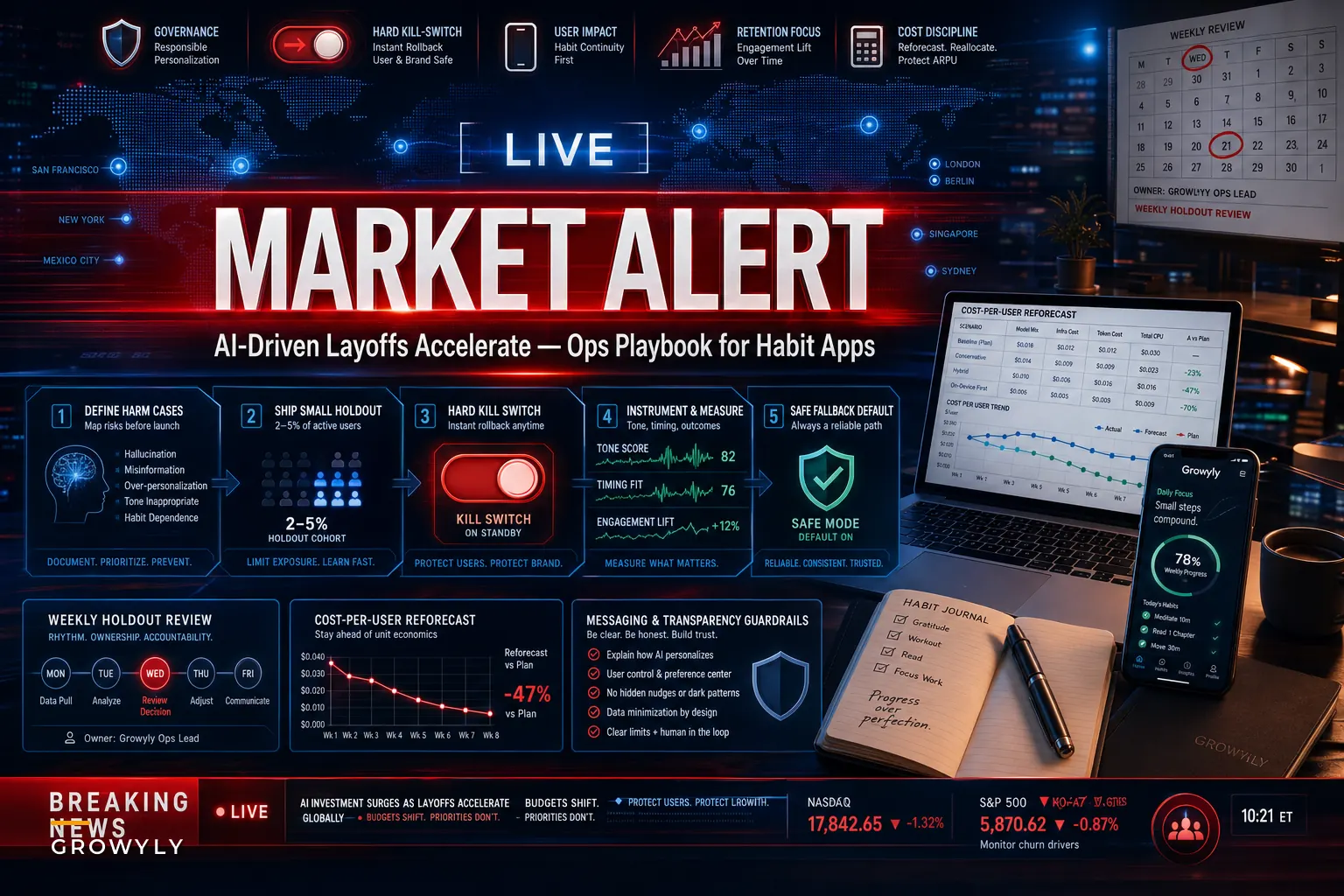

The headlines are blunt. A late‑October Reuters report described companies trimming headcount while shifting investment toward AI, and around the same window Amazon extended job cuts into its Devices & Services unit after a run of product launches. For most product and ops leaders, the real story isn't the layoffs themselves — it's the quiet expectation sitting underneath them: do more personalization, with fewer people, and don't break anything.
If you run product, engineering, or ops at a habit‑tracking or personal‑growth app, that expectation lands directly on your roadmap. You're being asked to ship AI‑personalized nudges, adaptive streak logic, and smarter reminders while your team gets leaner and your per‑user model spend becomes a line item finance actually watches now. This isn't about chasing a trend. It's about surviving a squeeze without degrading the one thing keeping your business alive: retention.
This is a playbook, not a prediction. The through‑line is AI-driven layoffs personalization governance — how to scale personalization responsibly when you have fewer hands to catch mistakes and more eyes scrutinizing your AI claims.
What's Actually Changing for Habit Apps (Beyond the Headlines)
The layoff cycle hits habit apps through three side doors, not the front one.
Talent supply shifts, but not evenly. There's suddenly more mid‑level engineering and data talent available, which sounds great until you realize the roles you need most — people who understand behavioral modeling and can reason about when a nudge is harmful — are still rare. You can staff faster; you can't necessarily staff smarter without being deliberate about it.
User budgets tighten at the exact moment AI expectations rise. Displaced or financially stretched users re‑evaluate every recurring charge. A habit app subscription at $6–$9/month is an easy cancel when someone's reassessing their bank statement. At the same time, those same users increasingly expect the app to just know what they need. Higher expectations, lower willingness to pay.
AI claims get more scrutiny. When every company says they're "powered by AI," users and regulators get skeptical. Overstated personalization claims — "our AI learns exactly what motivates you" — start looking like liabilities rather than marketing copy.
The underlying problem most teams miss: leaner teams don't just ship slower, they lose their safety margin. The engineer who used to notice that a reminder model was pinging grieving users during a hard week — that person's reviews, instincts, and informal QA often disappear first in a reorg. Personalization doesn't fail loudly. It fails as a slow drift in tone and timing that nobody's watching anymore.
The Hidden Cost Structure Nobody Reforecasts Until It Hurts
Most habit apps built their AI features during a period when model costs felt negligible. A single personalized reminder costs a fraction of a cent, so who's counting?
Achieve more by focusing on what matters.
Growyly helps you build lasting habits and track your personal growth effortlessly.
- Goal setting with progress tracking
- Daily habit reminders
- Motivational insights and analytics
No credit card required
The mistake teams make is treating AI spend as fixed infrastructure rather than a variable that needs throttling logic. Here's a more honest breakdown of where AI dollars actually go:
| Personalization Feature | Typical AI Cost Profile | Retention Impact | Throttle Priority |
|---|---|---|---|
| Adaptive reminder timing | Medium (frequent calls) | High | Keep, optimize |
| Personalized encouragement copy | High (generative, per‑user) | Medium | Cache & templatize |
| Weekly insight summaries | Low (batched) | Medium‑High | Keep |
| Real‑time "coaching" chat | Very High | Variable | Gate behind paid tier |
| Streak‑risk prediction | Low‑Medium (batchable) | High | Keep, batch it |
The pattern worth noticing: the features that cost the most are rarely the ones driving the most retention. Real‑time generative coaching feels premium but often moves the needle less than a well‑timed, cheaply‑computed streak‑risk nudge. Teams keep the expensive thing because it looks impressive in demos, then wonder why margins erode.
A Minimal‑Risk Rollout Process for Leaner Teams
When you have fewer engineers, every AI feature needs to be reversible by default. You can't afford a two‑week incident response for a nudge model that started misfiring. Here's a rollout sequence built for small teams:
-
Define the harm case before the success case. Before writing a line of the feature, document what "this going wrong" looks like for a vulnerable user — a reminder model that nags someone who's sick, a "motivational" message that reads as guilt‑tripping during a lapse. If you can't name the harm, you're not ready to ship.
-
Ship to a 2–5% holdout with a hard kill switch. Not a feature flag you have to redeploy to flip — an actual runtime toggle anyone on call can hit in under a minute.
-
Instrument tone and timing, not just clicks. Click‑through tells you engagement. It doesn't tell you if the nudge made someone feel worse. Track unsubscribe spikes, reminder‑disable rates, and sudden drops in session length right after a message fires.
-
Set a fallback that's always "good enough." When the model is throttled, down, or uncertain, it should degrade to a simple, safe default — a plain scheduled reminder — not an error or silence.
-
Review the holdout weekly with one named owner. With a small team, diffusion of responsibility is deadly. One person owns the "is this hurting anyone" question.
That fourth step is where most teams cut corners. The fallback isn't a nice‑to‑have — in a lean org it's your insurance policy. When your AI vendor has an outage or your budget forces throttling, the fallback is what keeps users from noticing anything broke.
Make the fallback a plain scheduled reminder — it's your insurance policy.
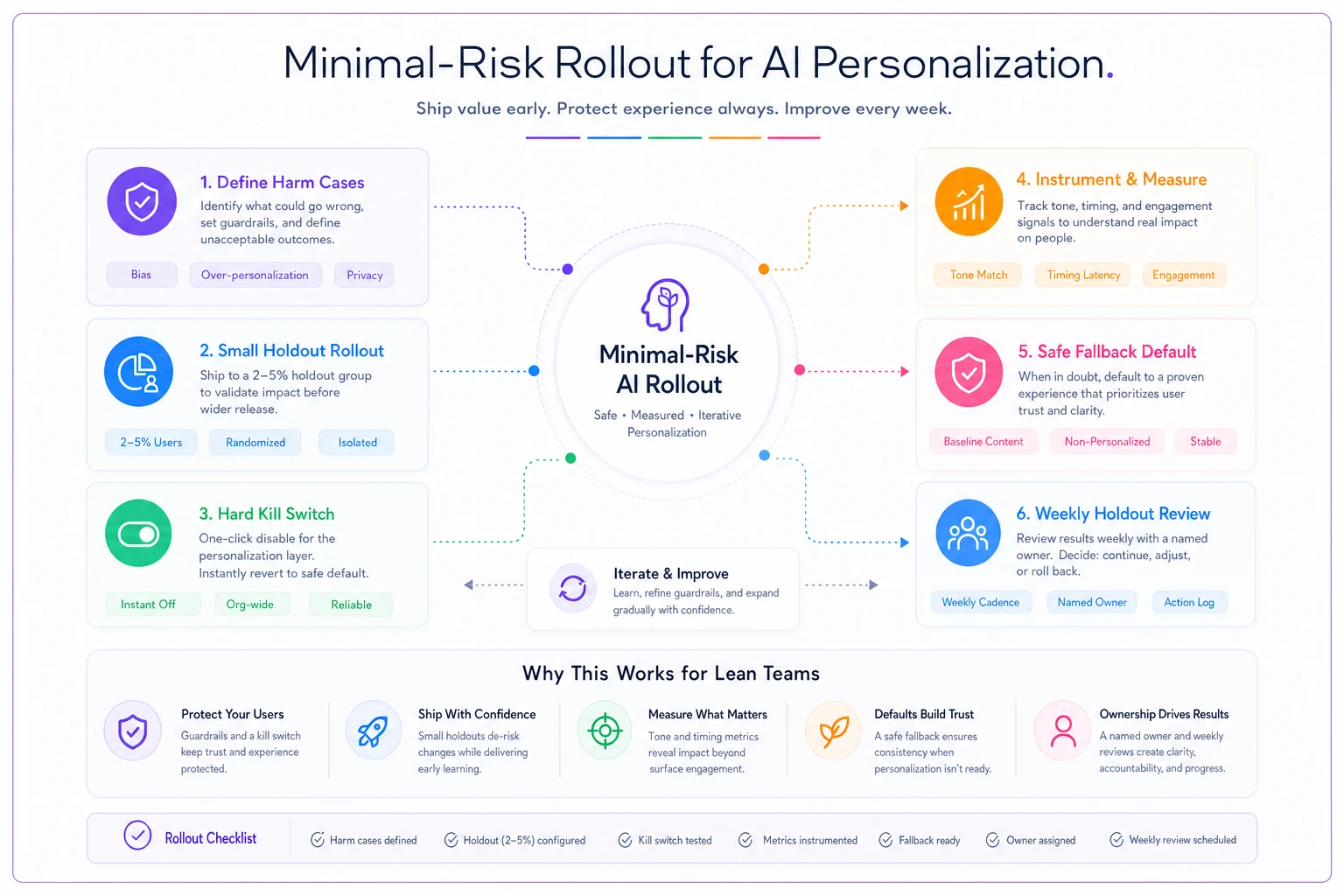
This sequence keeps features reversible, observable, and simple to operate for a small on‑call team.
Governance Is the Thing That Scales When Headcount Doesn't
When you lose the people who used to catch personalization mistakes informally, you have to replace that human judgment with explicit rules. Not more meetings — actual written guardrails about what personalization is and isn't allowed to do.
This is where a real framework matters more than ever. If you haven't formalized it, the operational governance framework for personalization in habit apps is the backbone this whole playbook leans on. The short version: governance is what lets a smaller team operate safely at the scale a larger team used to manage.
A few governance rules that earn their keep when you're understaffed:
-
A "do not personalize" list. Certain moments — a user who just logged a relapse, someone who disabled most features, a long‑dormant account — should get simpler, gentler treatment, not more aggressive AI targeting.
-
Confidence thresholds with human‑safe defaults. If the model isn't confident, it falls back to generic. Low confidence should never produce a bold, specific claim about a user.
-
A claims register. Write down every personalization claim your marketing and UI make ("adapts to your schedule"), and tie each one to something the product actually does. This is your defense when AI accuracy gets scrutinized.
-
Change logs for model and prompt updates. When a nudge starts behaving differently, you need to know what changed and when. Small teams skip this and then spend days guessing.
Governance converts tribal knowledge into something that survives a reorg. The engineer who just knew not to nag sick users leaves; the written rule stays.
When Aggressive AI Personalization Is a Bad Idea Right Now
Not every app should be leaning harder into AI during this window. Some should pull back.
When it makes sense: You already have clean signal on what drives retention, your per‑user economics have room, and you have at least one person who owns personalization safety. In that case, cheaper models plus smarter throttling let you do more for less.
When it's a bad idea: Your team just absorbed cuts and nobody clearly owns AI quality. Adding generative personalization on top of an overloaded team is how you ship the misfiring nudge that triggers a churn spike you won't notice for a month.
Who should skip this entirely: Teams whose retention problem is actually a core product problem. No amount of personalized copy fixes a habit app where the basic logging flow is clunky. AI personalization amplifies whatever's underneath it — if the foundation annoys people, smarter targeting just annoys them more precisely.
A Real Scenario: Trading Expensive Flash for Cheap Reliability
A personal‑growth app in the 50k–60k monthly‑active range had built a real‑time AI "coach" chat as its flagship feature. After a round of cuts took their team from nine engineers to six, two things happened at once: their monthly model bill was becoming a visible problem — somewhere in the low four figures and climbing — and nobody had clear ownership of whether the coach was actually giving good advice.
Rather than defend the flashy feature, they did the unglamorous thing. They gated the real‑time coach behind their top paid tier, where usage was lower and willingness to pay was higher. For everyone else, they shifted budget into a cheap, batched streak‑risk prediction model that flagged users likely to lapse and sent a single, well‑timed, templated nudge the night before.
The results weren't dramatic in a demo sense, but they were real. Their AI spend dropped by roughly a third. The streak‑risk nudge, despite costing a fraction of the coach, correlated with a noticeable lift in week‑four retention among at‑risk users. And because the nudge was templated with a safe default, a leaner team could actually maintain it without constant babysitting. The flashy feature survived as a premium perk; the cheap reliable one carried the retention weight.
The lesson wasn't "AI bad" or "AI good." Under budget and headcount pressure, boring and governed beats impressive and fragile.
A Short Section for Power Users Worried About Changes
If you rely on one of these apps for your own routines, this layoff‑and‑AI cycle probably means something will change — pricing, a feature moving behind a paywall, or a reminder system that suddenly behaves differently. A few practical moves to protect your own progress:
-
Export your data now, while it's easy. Don't wait for a pricing change to make you scramble. If your app lets you export your habit history, do it periodically.
-
Know which features you'd actually miss. Most people use two or three core features. If those stay, a price bump may still be worth it. If the app guts the one thing you depend on, that's your signal to move.
-
Watch for tone drift in nudges. If your app's reminders start feeling pushier or oddly generic, that's often a sign of a model or budget change. Trust your read on it — and disable features that stop serving you.
-
Treat free‑tier downgrades as a nudge, not a wall. When apps throttle AI features for non‑paying users, the underlying habit system usually still works fine with manual reminders. You don't need the fancy layer to keep the habit.
Your progress belongs to you, not to a feature that may or may not survive the next reorg. Build your routines so that losing the AI layer is an inconvenience, not a collapse.
Where This Leaves Product and Ops Leaders
The teams that come through this window in good shape won't be the ones who shipped the most AI features. They'll be the ones who matched their personalization ambitions to their actual capacity to govern it. Fewer engineers means less margin for a nudge that quietly harms, a claim you can't back up, or a model bill nobody reforecasted.
The work ahead is less about building new AI and more about building the guardrails that let a leaner team run it safely. Reforecast your per‑user spend. Throttle the expensive features that don't earn their cost. Write down the rules your departed colleagues used to carry in their heads. Make every personalization feature reversible by default. Do that, and you can scale responsible personalization through the squeeze — and protect the retention curve that everything else depends on.
The work ahead is less about building new AI and more about building the guardrails that let a leaner team run it safely. Reforecast your per‑user spend. Throttle the expensive features that don't earn their cost. Write down the rules your departed colleagues used to carry in their heads. Make every personalization feature reversible by default. Do that, and you can scale responsible personalization through the squeeze — and protect the retention curve that everything else depends on.
Ready to unlock your full potential?
Join thousands of users transforming their lives using Growyly to stay motivated, organized, and growth-focused every day.