


Switching habit trackers should feel like switching phones: annoying, but survivable. Instead it usually feels like moving to a new country where nobody speaks your language and your old ID is worthless. You export a file, open it in the new app, and suddenly your 400-day meditation streak is a column of timestamps with no context, your "energy level" scores collapsed into a single number, and half your tags just gone.
The frustrating part is that none of this is a technical limitation. It's a design choice. Most apps make it easy to put data in and quietly difficult to get meaningful data out. The result is a slow, invisible form of lock-in where the real cost isn't your subscription — it's the years of signal you can't take with you.
This is the thing I wish existed when I first tried to consolidate three trackers into one. A minimal, vendor-neutral way to think about your habit data as structured artifacts, plus the export, retention, and migration mechanics that actually preserve fidelity when you move. The goal of habit data portability isn't to geek out over JSON — it's to make sure the behavioral history you've built is yours, readable anywhere, forever.
Why your data breaks the moment you move it
Every tracker invents its own vocabulary for the same handful of real-world events. One app calls a completed habit a "check-in." Another calls it a "log entry." A third stores it as a "completion event" with a nested payload. Underneath, they're all describing the same thing: you did a thing at a time, and here's some context.
When these tools export, they dump their internal structure, not a shared standard. So the migration doesn't fail because the data is missing — it fails because the meaning is trapped in a format only the original app understood.
-
Lossy summaries instead of raw events. The app exports your streak count but not the individual days that produced it. You can see "182" but can't reconstruct it.
-
Collapsed scales. A 1–5 mood rating gets exported as text ("Good," "Great") with no key, so the new tool can't tell if "Great" is a 4 or a 5.
-
Orphaned context. Notes, tags, and photos live in separate tables that don't survive the export, so you keep the what but lose the why.
-
Timezone drift. Timestamps stored in local time with no offset mean a workout logged at 11pm in one city lands on the wrong day after you move.
None of these are edge cases. They're the default outcome. And they compound — the longer your history, the more there is to lose, and the more motivated the app is to make leaving painful.
If you've already read about collecting only the signals you can act on, this is the natural next step. Collecting the right signals is pointless if you can't keep them when your tools change.
Think in artifacts and signals, not app features
The mental shift that fixes most of this: stop thinking in terms of "my Streaks app data" and start thinking in terms of artifacts and signals that happen to live in an app right now.
Achieve more by focusing on what matters.
Growyly helps you build lasting habits and track your personal growth effortlessly.
- Goal setting with progress tracking
- Daily habit reminders
- Motivational insights and analytics
No credit card required
An artifact is a concrete, provable thing — a completed session, a journal entry, a photo of your finished page, a timestamped recording. A signal is a measurement or rating you attached — a mood score, a difficulty rating, a duration, a self-assessed quality.
Almost every habit tracker on the market, no matter how different the UI, is really just storing some combination of these two things. If you can describe your data in neutral terms, you can describe it in a way that survives any migration.
Say you track "evening reading." Each day produces:
-
an event (you read, on this date, at this time)
-
a duration signal (22 minutes)
-
a quality signal (focus rating, 3 out of 5)
-
an artifact (a note
"chapter 7, got sleepy toward the end")
Any tool can represent that. The problem is only that each tool names and nests it differently. A shared schema just forces everyone to speak the same four words.
A minimal, vendor-agnostic schema
{ "schemaversion": "1.0", "habit": { "id": "evening-reading", "name": "Evening Reading", "cadence": "daily", "unit": "minutes" }, "events": [ { "eventid": "2024-03-14-evening-reading", "timestamp": "2024-03-14T22:10:00-05:00", "status": "completed", "signals": { "durationmin": 22, "focusquality": { "value": 3, "scalemin": 1, "scalemax": 5 } }, "artifacts": [ { "type": "note", "content": "chapter 7, got sleepy toward the end" } ], "source_app": "AppName", "tags": ["fiction", "weeknight"] } ] }
A few deliberate choices here matter more than they look:
-
Every event has a stable
event_id. This is how you deduplicate when you merge data from two apps that both logged the same day. Without it, migrations create ghost duplicates. -
Signals carry their own scale. Storing
scaleminandscalemaxalongside the value means a 3 is never ambiguous. This single field prevents the most common silent corruption in migrations. -
Timestamps always include an offset.
-0500 isn't decoration — it's what keeps a late-night log on the correct day across timezones.
-
source_apptravels with each event. When you've merged three tools, you can always trace where a record came from, which matters a lot when something looks off.
The schema is intentionally boring. Boring is portable. Clever is lock-in.
Export and retention semantics: what "keeping your data" actually means
Exporting once isn't a strategy. Retention is. The question isn't "can I get my data out" — it's "can I get a complete, re-importable copy, on a schedule, without manual effort."
Three export modes worth distinguishing, because apps blur them on purpose:
| Export type | What you get | Fidelity | Good for |
|---|---|---|---|
| Display export | A PDF or summary report | Very low | Reading, not moving |
| Flat CSV | One row per event, flattened | Medium — loses nesting | Simple habits, spreadsheets |
| Structured export (JSON) | Full events, signals, artifacts | High | Real migration |
Most apps proudly offer the first two and bury or omit the third. A CSV looks like a real export, but the moment your habit has more than one signal per day, flattening starts throwing away information — it either crams everything into one cell or silently drops columns.
On retention, set a rule for yourself rather than trusting any single app:
-
Pull a structured export at least quarterly, more often if you're actively experimenting.
-
Keep the last several exports, not just the newest — if an app corrupts something, you want a clean prior copy.
-
Store exports somewhere you control, not inside another app that could lock those up too.
Think of it like a backup policy for your behavior. The habit of exporting is itself worth keeping.
PRO-TIP-SENTENCE: Automate structured exports with a calendar reminder so you don't forget the quarterly pull.
The habit of exporting is itself worth keeping.
Anonymized sharing: proving progress without leaking your life
Habit data is personal. Your sleep logs, your mood scores, your journal notes — these say a lot about you. But there are legitimate reasons to share: an accountability partner, a coach, a small group, a community challenge.
The mistake people make is sharing the raw file. You don't need to. Most sharing scenarios only require a projection of your data, not the whole thing.
-
Signal-only share. Export completion status and a single metric (streak length, weekly frequency) with all notes, tags, and artifacts stripped. Enough to prove consistency, nothing more.
-
Aggregate share. Instead of day-by-day events, share rolled-up weekly or monthly counts. "Meditated 24 of 30 days" without the timestamps.
-
Redacted artifact share. Keep the event structure but replace note content with
[redacted]or a length indicator. The coach sees you journaled, not what you journaled. -
Pseudonymized merge. For group challenges, strip the
source_app, real name, and any free-text, keeping onlyhabit.idand completion signals under a random participant key.
Decide what the other party actually needs to do their job, and share only that layer. A coach checking adherence needs frequency, not your 2am anxiety notes. This maps closely to the privacy thinking in any good buyer's guide that weighs app privacy and integrations — portability and privacy are the same muscle, used in different directions.
Stepwise migration: moving without losing signal
Below is the actual sequence for moving a tracker in the order that minimizes damage. Most botched migrations happen because people import before they've validated anything.
-
Freeze the source. Stop logging new data in the old app for a day or two so nothing changes mid-move.
-
Pull the highest-fidelity export available — structured JSON if possible, full CSV if not.
-
Normalize to the schema. Map the old app's field names to the neutral artifact/signal structure. This is where you catch collapsed scales and orphaned notes.
-
Validate before importing. Count events in the export and compare to what the old app claims you have. If the app says 300 completions and your file has 268, stop and find the missing 32.
-
Spot-check signal fidelity. Pick ten random events. Do the ratings, durations, and timestamps match what you remember or what the old app displays? Pay close attention to anything near a timezone boundary.
-
Import into the new tool — ideally into a test habit first, not your live one.
-
Reconcile. After import, re-run the counts. Source count should equal destination count. Any gap is lost signal.
-
Keep the old export permanently. Even after a clean migration, that structured file is your insurance.
The single most skipped step is #4. People trust the import dialog's green checkmark. But "import succeeded" only means the file parsed, not that the meaning survived. Counts and spot-checks are the only real proof.
Here's a quick visual of the migration sequence.
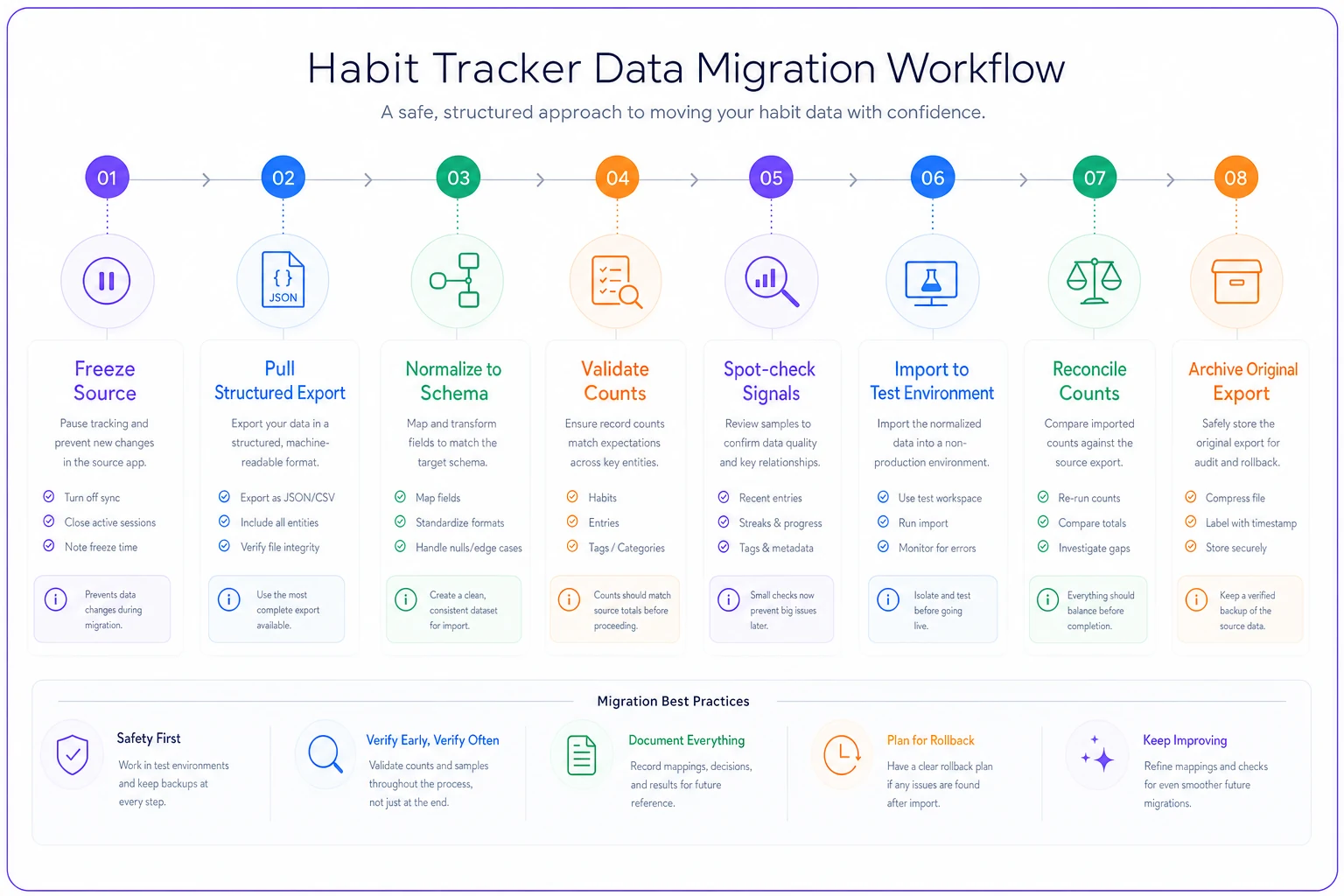
A quick visual helps teams and individuals follow the same checklist without skipping validation steps.
Migration checklist
Before you consider a move complete, run through this:
-
- [ ] Structured export obtained (not just a display PDF)
-
- [ ] Every habit's full event history present, not just summary counts
-
- [ ] Signal scales documented (what does a "3" mean?)
-
- [ ] All timestamps carry timezone offsets
-
- [ ] Notes, tags, and artifacts preserved or deliberately dropped
-
- [ ] Source event count recorded before import
-
- [ ] Destination event count matches after import
-
- [ ] Ten-event spot-check passed
-
- [ ] Timezone-boundary events verified on correct days
-
- [ ] Original export archived somewhere you control
-
- [ ] Old app kept active (read-only) until new tool proven for 2–3 weeks
If any box is unchecked, you haven't migrated — you've started migrating.
A worked example
Consider someone moving two years of data out of a tracker that's raising its price. Four habits, roughly 1,900 total completion events across both years.
The first CSV export looked complete — until the count check. The file had about 1,640 rows. The missing 260 or so turned out to be events the app stored as "partial" completions, which the CSV export silently skipped. Switching to the JSON export (buried two menus deep) recovered them.
Then the spot-check caught a second issue: mood scores exported as words, not numbers, with no legend. "Fine," "Good," "Strong" — three values, but the new app expected a 1–5 scale. Mapping them by hand to 2, 3, and 4 took about fifteen minutes and preserved a signal that would otherwise have become unusable text.
Final reconciliation: 1,900 in, 1,900 out, scales intact, notes preserved. The whole thing took an evening instead of the "two minutes" the import wizard promised — but nothing was lost. A quick CSV import would have quietly discarded around 14% of the history and corrupted the mood signal entirely, and nobody would have noticed until months later.
When this level of rigor makes sense — and when it doesn't
Do the full process when: you have more than a year of history, you track multiple signals per habit, your data feeds real decisions (deliberate practice, health tracking, long experiments), or you're consolidating several tools into one. The fidelity is worth protecting.
Skip most of it when: you've been tracking for three weeks, you log a single yes/no per day, or the data is genuinely disposable. Normalizing a schema for a two-week streak is over-engineering. Just re-start in the new tool.
Who should be most careful: anyone whose habit data informs something consequential — people managing a condition, serious skill-builders, anyone who's invested years. For you, the export habit isn't optional. The cost of lock-in grows with every month you add.
The real reason portability matters
Lock-in is rarely a dramatic event. No app deletes your data and laughs. It's slower — a price hike you accept because leaving means losing history, a better tool you don't try because migration looks terrifying, a format you can't read three years later when the company shuts down.
Treating your habit data as portable artifacts breaks that trap. When your history lives in a neutral structure you understand and control, your tools become replaceable and your data becomes permanent. That's exactly the right way around. You should be able to walk away from any app whenever you want, carrying every completion, every signal, every note with you, fully intact.
Pick your next export this week. Open it. See if you can actually read it. That five-minute test tells you more about whether you're locked in than any feature list ever will.
Pick your next export this week. Open it. See if you can actually read it. That five-minute test tells you more about whether you're locked in than any feature list ever will.
Ready to unlock your full potential?
Join thousands of users transforming their lives using Growyly to stay motivated, organized, and growth-focused every day.