

Most habit advice assumes a specific kind of person: someone with steady eyesight, quick fingers, reliable memory, full mobility, and enough spare attention to fiddle with an app three times a day. Design only for that person, and everyone else ends up with a system that slowly falls apart on them — not because they lack discipline, but because the scaffolding was never built to hold their actual body and brain.
That gap is where inclusive habit design does its real work. It's not about slapping a "large text" toggle on a routine and calling it accessible. It's about treating accessibility as a set of reusable building blocks — primitives — that you can drop into any habit so it survives a bad-vision day, a shaky-hands week, or a stretch where working memory just isn't there.
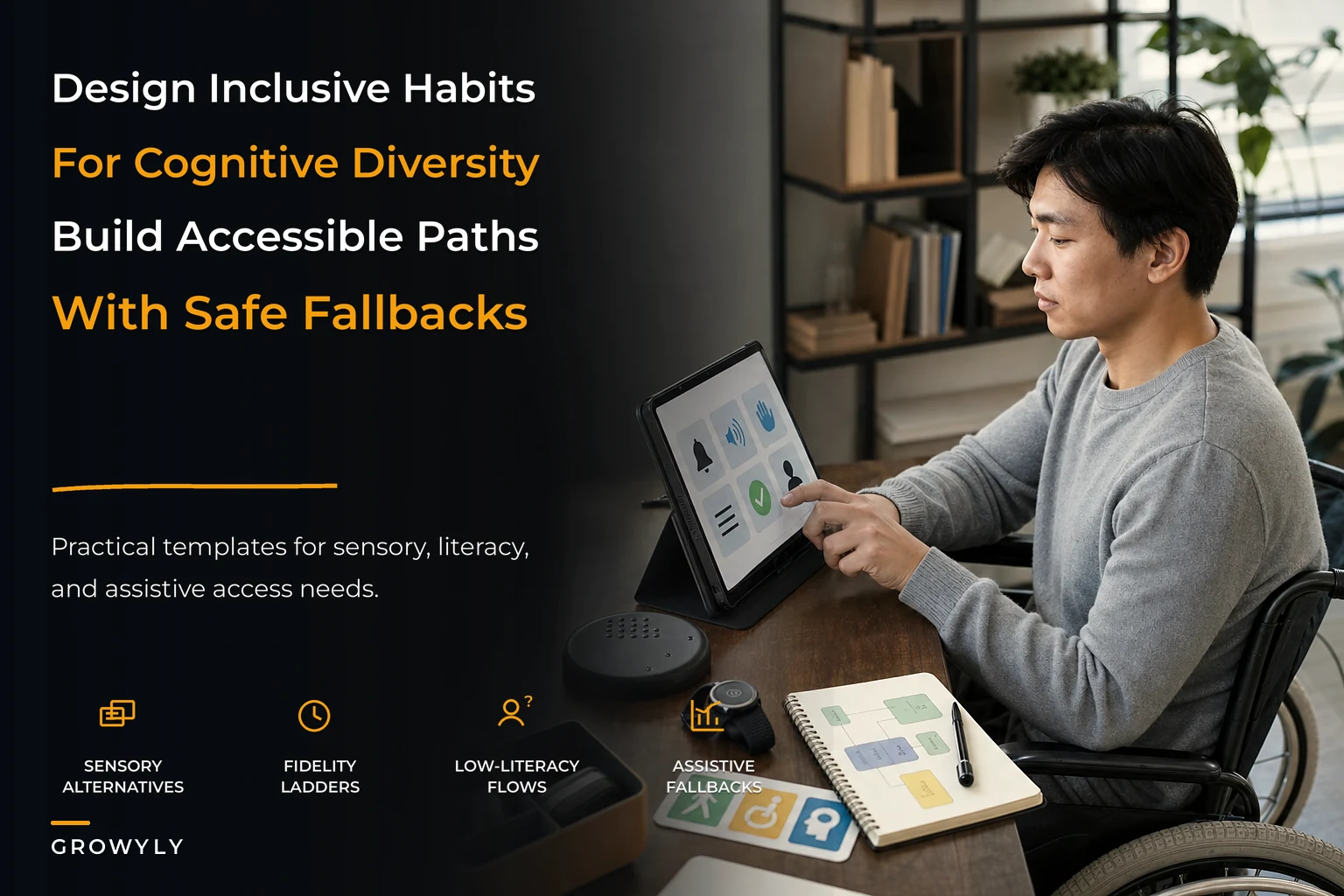
This post walks through those primitives the way you'd actually assemble them: sensory alternatives, progressive-fidelity ladders, low-literacy flows, and assistive fallbacks. Then a policy checklist and a few templates you can adapt for aging, low-vision, mobility, and cognitive differences.
Why "normal" habit systems quietly exclude people
The core problem is that most habit systems bundle the behavior with a single way of triggering, tracking, and confirming it. One cue. One input method. One reward signal. When any single channel fails, the whole habit fails with it.
Take a common setup: a phone notification pops at 8am, you tap it, you log a checkmark. That's three assumptions stacked on top of each other — you can see the notification clearly, you can tap accurately, and you hold the meaning of that checkmark in your head. For a lot of people, at least one of those three breaks regularly.
-
Someone with macular degeneration might not reliably see a low-contrast notification badge.
-
Someone with tremor or arthritis might tap the wrong thing half the time, then give up on precise logging entirely.
-
Someone with post-concussion fog or ADHD might see the reminder, dismiss it, and lose the thread within seconds.
These aren't edge cases stacked at the margins — they rotate. Someone without any diagnosed condition still has low-vision mornings before coffee, shaky-hands days after a hard workout, and foggy weeks during grief or illness. Designing for cognitive diversity and accessibility isn't charity work for "other people." It's building a system with enough redundancy that it doesn't collapse the first time a channel goes dark.
This connects closely to resilience-first habit design, where the whole point is that capacity drops and the system needs to bend instead of break. Accessibility primitives are the specific bends.
The core primitives (and how they connect)
These four building blocks stack. Individually they help. Together they create a habit that has no single point of failure.
Achieve more by focusing on what matters.
Growyly helps you build lasting habits and track your personal growth effortlessly.
- Goal setting with progress tracking
- Daily habit reminders
- Motivational insights and analytics
No credit card required
1. Sensory alternatives
The rule: every important signal should exist in at least two senses.
If a cue is only visual, add sound or touch. If it's only audio, add a visual or vibration. This sounds obvious, and almost nobody does it, because the default apps ship one channel and you never think to layer another.
-
Visual a large, high-contrast card on a home screen or a physical object placed in the sink
-
Audio a spoken cue ("water, then meds") rather than a generic chime
-
Tactile a phone vibration pattern, or a physical object you move from one bowl to another
The thing most people miss: sensory alternatives aren't just for permanent impairment. They're for context. A deaf user needs the visual and tactile channel always. A sighted user needs the audio channel when cooking with hands full and glasses off. Same primitive, different trigger.
2. Progressive-fidelity ladders
This is the primitive that does the most quiet heavy lifting, especially for aging and cognitive differences.
A fidelity ladder means every habit has multiple valid versions — from "full" down to "barely counts but still counts." You don't drop the habit when capacity falls. You drop down a rung.
Here's a fidelity ladder for a walking habit designed for someone with variable mobility:
| Rung | Version | When you use it |
|---|---|---|
| Full | 20-minute outdoor walk | Good energy, good weather, steady balance |
| Reduced | 8–10 minutes, flat route, cane | Moderate day |
| Minimal | Walk to the mailbox and back | Low energy, pain flare |
| Symbolic | Stand and shift weight for 60 seconds by a window | Bad pain day, still counts |
| Rest-with-intent | Marked as intentional rest, not a miss | Recovery needed |
The key design decision: the symbolic rung must still register as a "done," not a failure. The moment your system codes a low-fidelity day as a broken streak, you've built shame into it — and people abandon shameful systems fast.
This connects to how neurodivergent-friendly scaffolds reduce overwhelm — the ladder gives a low-executive-function day a legitimate, pre-decided path instead of forcing an all-or-nothing choice at the worst possible moment.
3. Low-literacy flows
Low-literacy here means two things: people who read at a lower level, and people whose reading capacity drops under stress, fatigue, cognitive load, or in a second language.
A low-literacy flow strips a habit down to:
-
Icons before words
-
Short verbs, not sentences ("Walk." not "Complete your daily walking objective.")
-
One decision per screen, never a wall of options
-
Color and shape carrying meaning, not just text
A reminder that reads "Time to take your evening medication as prescribed by your care plan" fails a tired brain. "💊 Meds now" works. Same information, radically less load.
The mistake people make is treating low-literacy design as dumbing down. It isn't. It's reducing extraction cost. Even fluent readers benefit — nobody wants to parse a paragraph to check off a habit.
4. Assistive fallbacks
A fallback is what the habit does when the primary path fails entirely. Not a lower rung — a completely different route.
-
If someone can't tap a screen, a fallback is a voice log ("mark it done") or a caregiver confirmation.
-
If someone can't see the app at all, the fallback is a physical token system — moving a stone, flipping a card.
-
If someone forgets entirely, the fallback is a human check-in, scheduled and expected, not a nag.
The connective insight across all four: primitives are meant to be combined, not chosen. A well-built habit for an aging parent with low vision and early memory changes might use spoken cues (sensory), a three-rung ladder (fidelity), icon-only confirmation (low-literacy), and a daily caregiver text (fallback) — all at once, all quietly redundant.
How this breaks at scale (more habits, more people, more coordination)
One accessible habit is manageable. The system starts creaking when you have several habits, or when other people are involved — a caregiver, a partner, a support worker.
Here's where the coordination bottlenecks show up:
Bottleneck 1: Inconsistent primitives across habits. If your walking habit uses vibration cues but your medication habit uses a chime and your hydration habit uses a text, the user has to learn three different signal systems. Cognitively, that's expensive. In practice this happens because each habit got set up separately, on a different day, in a different app. The fix is a shared signal vocabulary — same vibration pattern always means "cue," same color always means "done."
Bottleneck 2: Caregiver overload. When fallbacks all route to one human, that human becomes the single point of failure you were trying to avoid. A caregiver checking six habits across two people burns out at roughly the same rate as any overloaded operator. The system needs to distinguish "must be human-confirmed" habits from "nice-to-confirm" ones and only escalate the critical ones.
Bottleneck 3: The fidelity ladder gets ignored under pressure. People forget their own rungs exactly when they need them — during a flare, a crisis, a foggy stretch. If the ladder lives only in someone's memory, it's useless at the moment of need. It has to be presented at decision time, not buried in a setup screen nobody revisits.
Bottleneck 4: Drift in what "done" means. Over months, the symbolic rung quietly becomes the default, and the person stops climbing back up when capacity returns. Without a light periodic review, a temporary accommodation calcifies into a permanent ceiling.
A workflow that holds it together
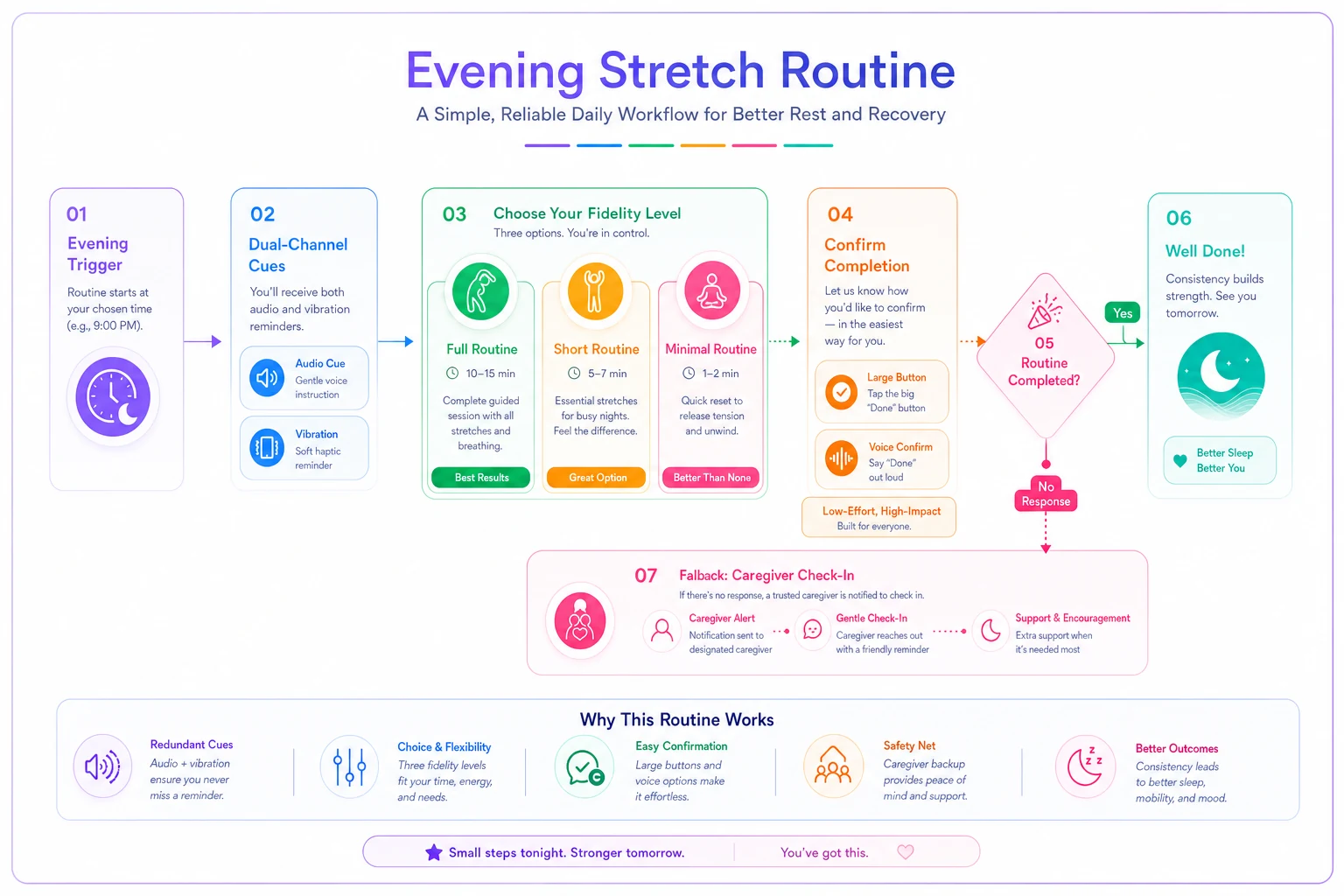
Here's how the pieces actually flow through a single day for a habit built with all four primitives — say, an evening stretching routine for someone with arthritis and fluctuating energy.
-
Cue fires in two channels. A soft spoken prompt plays and the phone vibrates. If the phone is silenced, a physical card by the couch is the third redundancy.
-
The system offers the ladder, not the full habit. Instead of "Do your 15-minute routine," it shows three icon buttons: full, short, minimal. One tap. No reading required.
-
The person picks a rung based on how the body feels that evening. Every rung is a valid "done."
-
Confirmation is low-cost. A single large button, a voice command, or — if the app was never opened — an automatic flip to "unconfirmed" rather than "failed."
-
Fallback triggers only if needed. If nothing is logged by a set time and this is a critical habit, one gentle check-in goes out. Non-critical habits stay silent.
-
Weekly light review looks at which rung got used most. If the minimal rung dominated for two weeks, that's a signal to check in on capacity — not to scold.
Accessibility isn't a feature you bolt on at step 5. It's decisions made at every step, especially steps 1 through 3, where most habit systems have already failed the user before they even get a chance to act.
Visualizing the daily flow can make it easier to align signals, confirmations, and fallbacks across people and devices.
Accessibility isn't a feature you bolt on at step 5. It's decisions made at every step, especially steps 1 through 3, where most habit systems have already failed the user before they even get a chance to act.
Policy checklist
Before you call any habit "accessible," run it against this:
-
Does every critical signal exist in at least two senses?
-
Is there a fidelity ladder with at least three rungs, including one symbolic rung that still counts as done?
-
Can the habit be completed and confirmed without reading a full sentence?
-
Is there a non-screen, non-tap fallback path?
-
Is the ladder shown at decision time, not buried in settings?
-
Do all habits share one consistent signal vocabulary?
-
Is there a clear line between human-confirmed and self-confirmed habits, so caregivers aren't overloaded?
-
Does a low-fidelity day register as success, never as a broken streak?
-
Is there a light periodic review to catch drift back up and down?
-
Has the person (or their caregiver) actually consented to the reminders, check-ins, and any data shared?
Present the ladder at decision time, not buried in settings.
That last point matters more than it looks. Accessibility work often involves caregivers, shared data, and monitoring, which raises real questions about autonomy and privacy. Worth reading through the consent and mental-health guardrails for habit change before building anything that involves another person watching over someone's habits.
Sample templates
Aging (mild memory changes, some low vision)
-
Sensory spoken cues + large high-contrast cards
-
Ladder full → seated version → symbolic
-
Low-literacy icon-first, one action per screen
-
Fallback scheduled daily voice or in-person check-in
Low-vision
-
Sensory audio-primary, tactile secondary, visual as backup only
-
Ladder standard, but confirmations via voice
-
Low-literacy screen-reader-friendly, but don't assume it — spoken prompts baked in
-
Fallback physical token system that doesn't require the screen at all
Mobility differences
-
Sensory whatever channel doesn't require reaching for a device — voice cue, ambient sound
-
Ladder heavily weighted toward reduced and symbolic rungs
-
Low-literacy voice confirmation so no precise tapping is needed
-
Fallback hands-free voice logging as the primary, not the backup
Cognitive differences (ADHD, executive dysfunction, brain fog)
-
Sensory cue must interrupt gently but clearly — pair sound with vibration
-
Ladder pre-decided rungs so no in-the-moment negotiation is required
-
Low-literacy absolute minimum decisions; one tap
-
Fallback external body-double or check-in partner for the hardest habits
Cognitive differences (ADHD, executive dysfunction, brain fog)
A real scenario
A woman in her late seventies with early-stage memory changes and worsening vision was trying to keep three habits going: morning medication, an afternoon walk, and evening hydration. Her daughter was managing it all through a mix of sticky notes, texts, and phone reminders. Adherence was rough — meds got taken maybe four or five days a week, walks happened only when someone physically prompted her, and the daughter was fielding what felt like a constant drip of small back-and-forths throughout the day.
The rebuild took a weekend. Cues moved to spoken prompts plus a vibrating watch. Each habit got a three-rung ladder, so the walk could become "to the mailbox and back" on a stiff day and still count. Confirmations became a single large button or a voice "done." The daughter's role shrank to one scheduled check-in for medication only — the one truly critical habit — instead of monitoring everything.
Over the following couple of months, medication adherence climbed to something close to six days a week and held there. The walk stopped being all-or-nothing, so it actually happened more often, just at lower fidelity on hard days. The daughter's daily coordination dropped from that constant stream of messages to a single predictable touchpoint. Nothing about her mother's condition changed. The scaffolding did.
When this is worth it — and when it isn't
When it makes sense: any habit that someone genuinely needs to keep but keeps losing to a sensory, physical, or cognitive barrier — and especially anything involving a caregiver, where coordination cost is bleeding people dry.
When it's overkill: a low-stakes habit for someone with no accessibility constraints and stable capacity. You don't need a four-primitive fortress around remembering to floss if flossing is going fine. Building elaborate ladders for habits that don't need them adds friction and clutter, which itself becomes an accessibility problem.
Who should be careful: anyone tempted to set this up for another adult without their buy-in. Accessibility scaffolding can slide into surveillance and control faster than you'd expect. If the person whose habits these are hasn't agreed to the cues, the check-ins, and the data sharing, you don't have an accessible system — you have a monitored one, and that's a different thing entirely.
The real shift
The move here is away from designing one perfect version of a habit and toward designing a habit that has many valid versions and no single point of failure. Sensory alternatives keep the cue alive when one channel goes dark. Fidelity ladders keep the behavior alive when capacity drops. Low-literacy flows keep it usable when attention and reading collapse. Assistive fallbacks keep it going when the whole primary path fails.
Build these primitives once and you can reuse them across a whole system — which is what makes the approach scale past a single habit. And the quiet payoff is that a system built to survive someone's worst day tends to be gentler and more durable for everyone's ordinary days too.
Build these primitives once and you can reuse them across a whole system — which is what makes the approach scale past a single habit. And the quiet payoff is that a system built to survive someone's worst day tends to be gentler and more durable for everyone's ordinary days too.
Ready to unlock your full potential?
Join thousands of users transforming their lives using Growyly to stay motivated, organized, and growth-focused every day.