

The hardest part of remote work isn't staying productive. It's building a wall between "working" and "done working" that holds up on a Thursday when three Slack threads are still open and your laptop is four feet from your couch.
Most people try to solve this with willpower. They decide they'll stop at 6. Then a message comes in at 6:12, and because the laptop is right there, they answer it. Then another. By 7:30 they've half-worked through what was supposed to be dinner, feeling guilty for being distracted and simultaneously guilty for not being fully offline.
That failure isn't a discipline problem. It's an architecture problem. You're asking your brain to make the same decision — do I respond or not? — dozens of times a night, and your brain is tired. The fix is removing the decision entirely by building a boundary that runs on rules, not mood.
This post covers the specific mechanics: DND automation rules, a tight 30-minute end-of-day shield, calendar formulas that defend your edges, and a light weekly audit so the whole thing doesn't quietly rot. No heavy process. Just the load-bearing pieces that actually hold.
Why the "I'll just stop at 6" plan keeps collapsing
The boundary fails at the exact moment it matters because nothing physically or digitally changes at 6pm. Your tools are still live. Notifications are still routed to the same screen. The context you were in at 5:58 is still fully loaded.
-
You "finish" but leave the laptop open "in case something comes up."
-
A low-stakes message arrives. Answering it feels trivial.
-
Answering it reloads your work context — now you're thinking about work again.
-
You notice two other things that need a reply, and you're back in.
The problem is step 1. An open laptop is an open invitation. Remote work boundary rituals fail when the environment doesn't change state at the same moment your intention does. Intention says "off." Everything around you still says "on."
There's also a subtler driver here. A lot of people keep notifications flowing after hours not because the work is urgent, but because being reachable feels like proof they're a good remote employee. When you can't be seen working, responsiveness becomes the visible signal. So you leave the channel open as a kind of alibi. That instinct is what quietly destroys evenings.
The 30‑minute end‑of‑day shield
The shield is a fixed, repeatable block at the end of your workday that closes loops and changes the state of your environment so the boundary enforces itself. Thirty minutes, same time every day, non-negotiable.
Achieve more by focusing on what matters.
Growyly helps you build lasting habits and track your personal growth effortlessly.
- Goal setting with progress tracking
- Daily habit reminders
- Motivational insights and analytics
No credit card required
The point isn't to "wind down." It's to make tomorrow's start easy and make tonight-you unreachable by default. Those two things together are what actually allow you to disconnect, because the anxiety that keeps people checking Slack is almost always "did I forget something?" — and the shield answers that before you leave.
A version that works for most knowledge workers:
Minutes 0–10: Dump and triage. Write down every open loop — unfinished tasks, promised replies, things you're worried about forgetting. Don't organize them. Just get them out of your head and into one place. Most of the anxiety you carry into the evening is "I'll forget something." Writing it down cuts most of that.
Minutes 10–20: Set tomorrow's first move. Pick the one thing you'll start with tomorrow and set it up so you can begin in under two minutes — tab open, doc ready, notes written. A frictionless start tomorrow is what lets you actually stop today.
Minutes 20–25: Send the "I'm offline" signals. Post any status updates, flag anything genuinely blocking someone, set your away message. This is where you discharge the "I need to be reachable" instinct in a controlled way, so you don't carry it into the night.
Minutes 25–30: Change the environment's state. Close the laptop. Actually close it. Move it if you can. Trigger your DND automations (more below). Do one physical action that marks the transition.
The shield pairs naturally with the kind of weekly front-loading covered in this breakdown of a 30-minute weekly decision-shield — the weekly version removes recurring choices; the daily shield removes the end-of-day drift.
DND automation rules that do the enforcing for you
Manual Do Not Disturb doesn't work because you have to remember to turn it on, and you forget on exactly the nights you most need it. Automation removes you from the loop entirely.
The goal is a set of rules that flip your tools to "closed" on a schedule, with narrow, intentional exceptions — not a wall with so many holes it's basically decorative.
A practical rule set:
| Rule | Trigger | Action | Exception |
|---|---|---|---|
| Hard stop | Daily at your end time | Phone + laptop DND on, Slack/Teams set to "Away – offline until [time]" | None for first 90 min |
| Narrow emergency path | Always on | One specific contact or keyword can break through | Direct manager / on-call only |
| Weekend block | Fri evening → Mon morning | All work apps muted, badges off | Pre-agreed on-call rotations |
| Morning ramp | Daily at start time | DND lifts, status returns to "available" | — |
Two rules that matter more than they look:
Kill the badge counts, not just the sounds. A silent "47 unread" badge is still a pull. Most after-hours checking is driven by the number, not the notification. Hide the count and the compulsion drops noticeably.
Make the exception path real but narrow. If everything can break through, nothing is blocked. Pick one genuine emergency channel — usually a direct call from a specific person — and route everything else to silence. Tell your team what the real emergency path is, once, in writing. Most "urgent" messages are only urgent because the sender knows you'll see them immediately.
A common mistake: people build elaborate rules but leave one app uncovered — usually email on the phone, or a secondary chat tool. That one open door undoes the whole system. Audit every app that can ping you, not just the primary one.
Here's a simple flow of how the DND automation rules interact.
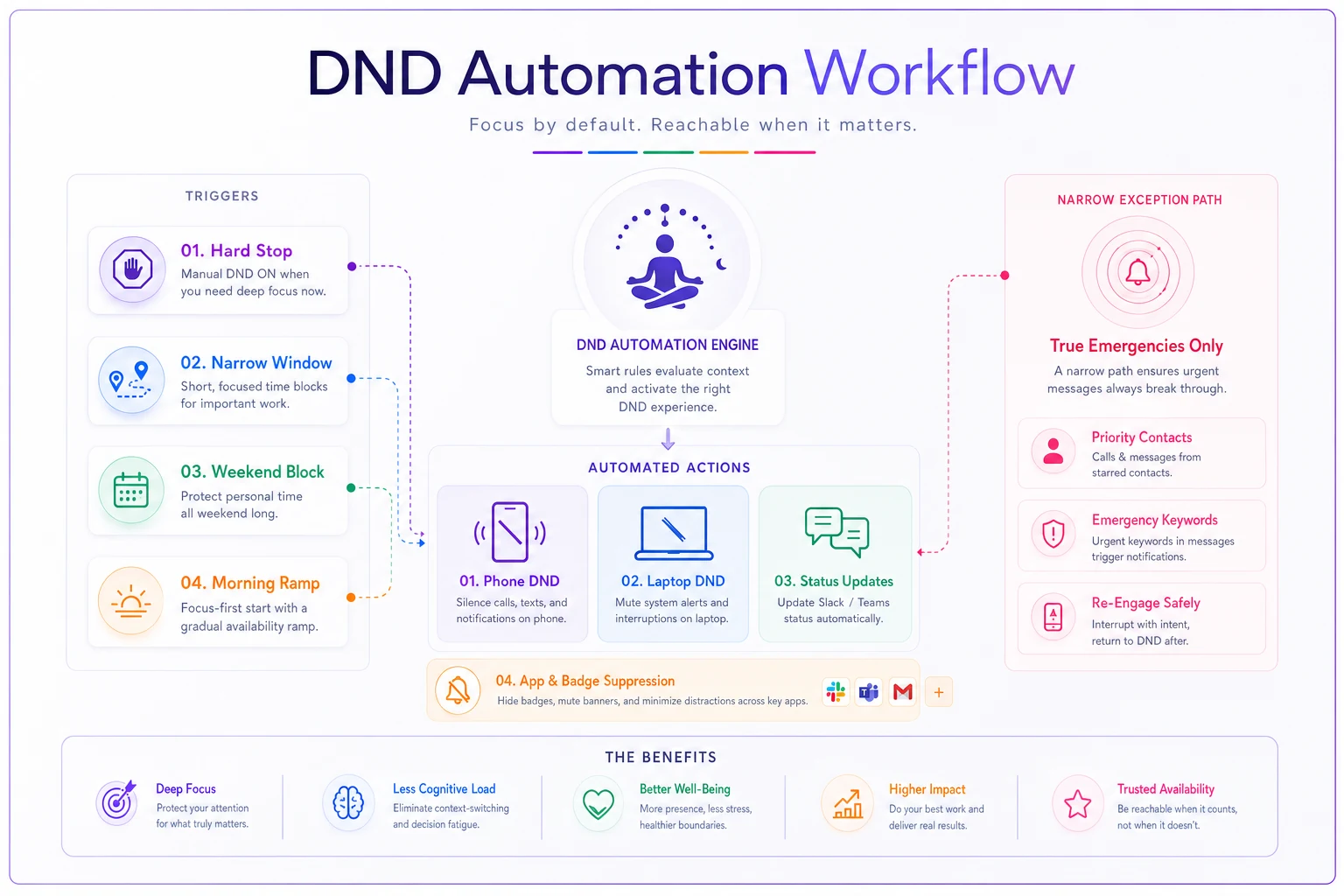
The flow shows how scheduled rules enforce a closed state, and how a deliberately narrow exception path allows only true emergencies to break through.
Calendar formulas that defend your edges
Your calendar is the clearest boundary signal you have, and most people leave it completely undefended. If your working hours end at 6 but your calendar shows availability until 8, you'll get 7:30 meetings, and you'll take them.
A few repeatable rules you set once do most of the protecting:
-
Bookend blocks. Put a recurring 30-minute block at the end of every workday labeled as your shield. Not "focus time" you'll sacrifice when someone needs a slot. The wall. Make it show as busy.
-
A hard availability edge. Set your scheduling windows to end before your actual stop time, not at it. If you stop at 6, let people book until 5. That buffer absorbs meetings that run long.
-
No-meeting transition zones. The first and last 30 minutes of your day should be unbookable. The last protects the shield; the first protects your ramp-up.
-
A weekly "defend the edges" pass. Once a week, scan next week for anything that crept past your boundary — an early call, a late meeting — and move it before it becomes the new normal.
Put the recurring end-of-day shield on your calendar and mark it as busy so others can't book over it.
The pattern worth naming: boundaries erode one exception at a time. A single 7pm call isn't the problem. The problem is that the 7pm call teaches everyone that 7pm is fair game. The calendar rules exist to make exceptions cost something to create, so they stay rare.
Physical and mental boundary anchors
Digital rules handle the tools. Anchors handle your brain. Without a physical signal, your nervous system never actually clocks out — you just move the laptop and keep ruminating.
An anchor is a small, consistent action that marks the transition from work to not-work. It works through association: do the same thing at the same boundary enough times, and the action itself starts triggering the shift.
-
A shutdown phrase. Say one specific sentence out loud when you close the laptop — something like "that's the workday." Sounds ridiculous. Works, because it's a clean, repeatable marker.
-
A location change. If you work in a dedicated space, physically leave it. If you work at the kitchen table, pack the laptop away so the space reverts to "not-office."
-
A change of clothes or a short walk. A five-minute walk is one of the most reliable transition rituals going — the remote-work version of a commute, which used to do this automatically.
-
A hardware swap. Move to headphones for music instead of calls, or shift to a different chair. Small sensory changes tell your brain the mode changed.
These pair well with the attention-reset logic in two-minute pre- and post-meeting anchors — same mechanism, different boundary. One resets you between calls; the end-of-day anchor resets you between work and life.
The mistake people make is skipping the anchor because it feels trivial. But the anchor is doing the emotional work the calendar can't. The calendar says you can stop. The anchor is what makes you feel stopped.
The weekly boundary audit (keep it under 10 minutes)
Boundaries drift. A new project adds a 6:30 standup "just for this sprint." A teammate in another timezone starts pinging at 8. None of it feels like a big deal in the moment, which is exactly why a scheduled check matters.
Once a week, run through this:
-
[ ] Did I run the end-of-day shield every day? If not, which days broke and why?
-
[ ] Did any after-hours messages get through that shouldn't have? Which app let them through?
-
[ ] Did any meetings land outside my working hours? Can I move the recurring ones?
-
[ ] Is my calendar availability still ending before my real stop time?
-
[ ] Did I check work tools after the shield this week? What triggered it?
-
[ ] Is the emergency exception path still narrow, or has it quietly widened?
The audit's real job is catching policy creep — the slow widening of what counts as an acceptable exception. Individual breaches are minor. The trend is what costs you. If the "narrow" emergency path now includes three people and a Slack channel, the system has already failed and you just hadn't noticed yet.
Ten minutes once a week is a reasonable price for that visibility. The broader logic of spending limited attention where it actually pays off is laid out in this map on attention budgeting; the weekly audit is just that principle applied to the one boundary most likely to quietly collapse.
A real scenario
A freelance product designer working with three retainer clients across two timezones was effectively "on" from 8am to around 9:30pm most days. Not working the whole time — but checking, responding, never fully off. She estimated she did real focused work maybe 5 hours a day but felt like she worked 13.
She set up the pieces above over about a week: a hard DND rule that killed all client-channel badges after 6:30pm, a single break-through path for one client with genuine on-call needs, a 25-minute end-of-day shield, and a calendar edge that stopped bookings after 5:30.
Nothing dramatic happened. No client complained. The one thing she expected — missing something urgent — didn't materialize, because almost nothing was actually urgent. Within about three weeks her evening check-ins dropped from constant to two or three glances a week, and her focused work hours nudged up slightly because her mornings started cleaner. The gain wasn't more hours. It was getting her evenings back and the mental quiet that came with them.
When this makes sense — and when it doesn't
Worth building if your work is async-friendly, your evenings are consistently leaking, and the "urgency" of after-hours messages is mostly perceived rather than real. That describes most remote knowledge work.
Bad idea if you're in a genuine on-call role where response time is part of the job — incident response, certain support tiers, some operations roles. Don't mute what you're being paid to watch. Build the boundary around your actual on-call windows instead of pretending they don't exist.
Go lighter if you're brand new in a role and still learning what's actually urgent. Keep the exception path a little wider for the first month, then tighten it as you learn the real emergency patterns. Starting with a hard wall before you understand the terrain can mean missing something that genuinely matters.
—
If you do nothing else: change the state of your environment at your stop time. Close the laptop, kill the badges, say the phrase. The calendar formulas, the audit — they're all there to protect that single moment of transition.
The boundary was never going to be held by willpower at 7:12pm when a message lights up your screen. It gets held by the fact that the screen doesn't light up at all, your tomorrow is already set up, and some small repeated signal has already told your brain the day is done. Build the few pieces that run on their own, keep the audit honest, and let the architecture carry the weight you were trying to carry yourself.
Ready to unlock your full potential?
Join thousands of users transforming their lives using Growyly to stay motivated, organized, and growth-focused every day.